Posted on November 27, 2009 at 03:47 UTC,
filed under the category
Bugdar.
Happy Thanksgiving to all you US citizens!
Today I’m releasing a security update to Bugdar, version 1.2.4. This version addresses a possible SQL injection vector in search.php. The details of the report can be found here. Thanks to Adam DiCarlo for disclosing the issue.
Please update to 1.2.4 as soon as you can. The release links can found on the normal Bugdar webpage. Alternatively, here are the direct ZIP and Tar links.
I apologize for the lack of posts, but I’d rather be coding rather than talking about coding ;). I’ll post an update on the state of Bugdar 2.0 in a few days.
I’m pleased to announce MacGDBp 1.3. This release features a new tool that allows you inspect values in the variables list via a HUD (screenshot below). This inspector will allow you to see long strings and to select/copy text values. To access this feature, go to Window → Inspector (Shift+Cmd+I). The currently-selected variable (which now, in 1.3, remembers itself across debugger stepping) will have its full value displayed in the HUD window.
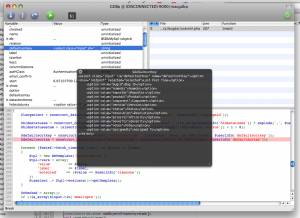
Under the hood, there are two significant changes. The first is a rewrite of the receiving side of the socket layer (it now precisely uses the message length when buffering memory), which should eliminate the “buffer is incomplete” errors that occasionally popped up. The second is that the PHP stack will no longer be managed internally. After every debugger step, the entire stack will be now re-created because Xdebug proved to be unpredictable for keeping in sync with an internal state. Debugger actions may now seem a little less snappy, but I think accuracy is more important than speed here. In 1.4 I’m going to use a caching mechanism that will speed up performance by reducing network access.
This release also features a bunch of bug fixes, a couple of which would cause the debugger display to not work under certain circumstances. As always, the change log and commit log have all the details on the release.
I cannot commit to a web browser. I like Firefox because I think it provides options (via extensions) and the awesome bar is, in fact, awesome. Safari however provides better platform aesthetic and WebKit is a faster rendering engine.
But besides that, I noticed recently that Firefox feels a little “cramped” after using Safari 4 beta. And this is the reason why:
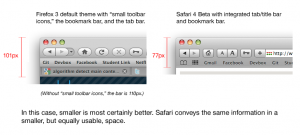
I’m amazed at what 24 pixels can do.
I’ve posted today a git repository called Toolchain. This is a collection of scripts that I use that others may find helpful. You can find the repository here. In this post, I’m going to talk about one of the items in Toolchain called Gitcrement.
Gitcrement is a set of two scripts that solves the problem of creating build numbers when using git for source control. Unlike Subversion, where the repository revision is the perfect choice for a build number, git has no such luxury because it uses SHA1 hashes for identifiers.
This is where Gitcrement comes in. Gitcrement is a simple interface to a database that contains a sequential ID number (the build number), a username, the current date/time, and a git SHA1 hash.
The gitcrement.py has four commands: init, next, list, and current.
To create a new Gitcrement database, go into any git repository root and type “gitcrement init“, which will create a new database file called .gitcrement.
When you want to create a new build number, simply type “gitcrement next” to record the current user (`whoami`), date and time, and whatever SHA1 hash `git info .` would reveal.
To see the current build number type “gitcrement current” and to get a list of all the build numbers type “gitcrement list“.
That’s all there is to it. To make this system useful, however, it needs a script that can be run in Xcode to automatically call “next” and save the value as CFBundleVersion in Info.plist. So, there’s another Python script called xcbuild.py, which you can use as a Custom Shell Script Build Phase. This will advance the Gitcrement number every time you build the “Release” target in Xcode.
Gitcrement requires Python 3.0, which is not installed by default in Leopard. You can find it here or through MacPorts or fink.
Also, you may need to edit the installation paths in the tops of both files to point to where your copy of “git” is (in gitcrement.py) and where you install the “gitcrement” script (in xcbuild.py).
You can download Gitcrement here:
Link in Gitweb
Source TGZ
Mac users interested in Google Chrome can now try out the latest pre-alpha development version. I have compiled the source tree and the binary can be found here. I’ll be rebuilding and posting the build roughly once a week.
As it says on the page, these builds are unstable and should only be used to see how development is progressing. I will not support these builds and (I’m assuming) neither will the Google team. That being said, enjoy.