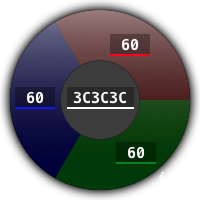
The RGB Converter dashboard widget allows creative professionals to convert between RGB color values
and HEX equivalents. You can manually enter values, or paste individual components or a
comma-separated string to change the color. The wheel automatically updates to visually show you the
color of each component and the resultant color. Since it runs as an Apple Dashboard widget, it’s
quick and always at your fingertips.
Changelog
3.0
11 December 2010
- Redesigned “wheel” interface
- Compatible with Safari 5.0
2.2
7 February 2008
- A minor centering bug on Leopard where the “green” input field would be drawn on the second line
- Removed the highlight on the leftmost swatch so that the true color is more evident and not confused with other hues
2.1
14 March 2007
- Allow pasting of HEX codes with # signs in front of them
- Allow pasting of RGB triads ("rgb(X,Y,Z)", "(X,Y,Z)", "X,Y,Z") in the R-G-B fields